What I learnt building my first agentic workflow in Azure AI Foundry
When I started building my F1 Copilot with Azure Foundry I expected most of my time to be spent writing prompts but actually the prompts were only a small part of the project.
Most of my time went into designing the workflow, understanding how data flowed between agents, debugging Power Fx expressions (😰), and figuring out how Azure AI Foundry expects you to model state.
Here are the biggest things I learnt.
1. The architecture matters more than the prompts
After working through the examples in the course I ended up with several specialist agents where each one has its own responsibility.
Tyre Engineer
      │
      ▼
Weather Analyst
      │
      ▼
Strategy Reviewer
      │
      ▼
Race Engineer
      │
      ▼
Human Approval
That made the prompts a lot simpler, but it also made the whole system easier to reason about. The more I worked on it, the more it felt like building software rather than ‘prompt engineering’.
2. Data flow is everything
One of the biggest mindset shifts was realising that an agent isn’t just generating text. Rather, it’s producing output that another part of the workflow needs to consume.
Once I started thinking about each agent having:
- inputs
- outputs
- responsibilities
the workflow became much easier to build.
Similar to my points above: it isn’t very different to designing APIs between services.
3. Human approval is surprisingly easy to add
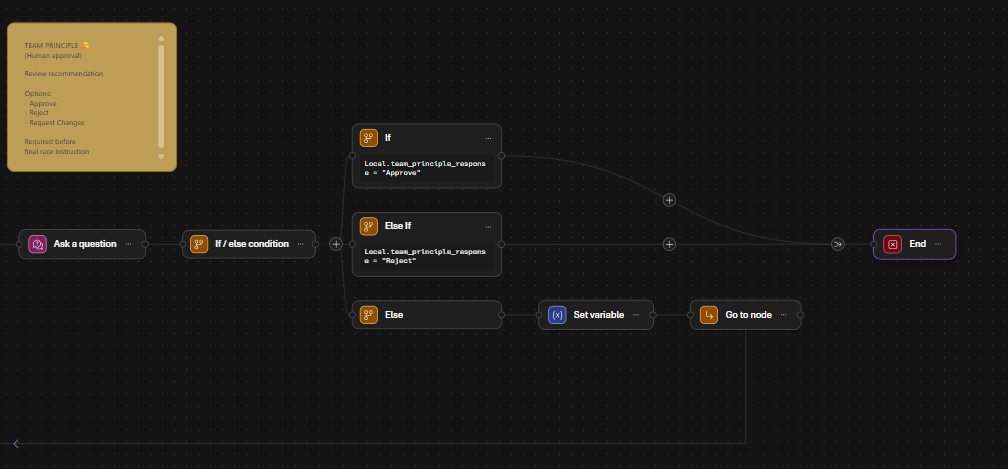
One of my favourite parts of Foundry was adding a human approval step using the drag-n-drop editor.
Instead of automatically acting on the Race Engineer’s recommendation, the workflow pauses and asks the Team Principal to approve it.
Approve
Reject
Request Changes
That single step made the demo feel much closer to a real production system where many business decisions shouldn’t be fully autonomous. Having a person review important recommendations feels like a sensible default.
4. Debugging workflows is different to debugging code
This probably surprised me the most, as you aren’t stepping through C# or TypeScript. Your application code is a very ‘thin’ client here, with the orchestration and execution happening in the cloud.
Instead you’re debugging:
- variables
- workflow state
- Power Fx expressions
- agent outputs
- branching logic
The Trace view was suprisingly helpful and useful to step through what happened when I was previewing the workflow.
5. Variable types matter
One mistake that caught me out was assuming every output was just text. Some nodes produce richer objects than others which wasn’t immediately obvious to me.
Understanding what ‘type’ a node actually outputs is important before trying to use it elsewhere in the workflow. The workflow designer generally tells you what variables exist, but it’s still worth checking the traces when something doesn’t behave as expected.
6. The tooling is good… but still evolving
I hit a few rough edges. Things like:
- Sometimes it just didnt Save my changes, even after clicking ‘Save’. This was infuriating!
- … and Ctrl+S didnt work so I had to click the Save button each time and there was no auto-save which feels like a step backwards.
- Power Fx errors that weren’t immediately obvious and I had to work a lot with ChatGPT to diagnose from screenshots..
- Learning when to use
Last()when working with collections of agent outputs. - Human approval branches that looked correct but didn’t execute how I expected.
- It took me ages to work out how to leave ‘Preview’ mode
- I wanted to create a workflow where each agent executed its instructions in parallel (e.g. the tyre engineer and weather analyst conducting their analysis at the same time instead of sequentially) but I couldn’y figure out a way of doing this in the Foundry portal.
- It was a bit annoying to have to go to the Azure Portal in a separate tab to check things like costs and would have been nice to have this in the Foundry portal directlt
- The look and feel of the Foundry portal is completely different to the rest of the Azure Portal and Microsoft interfaces which I found a bit jarring when I had to hop back-and-forth.
- It would be nice to have different colour sticky notes, not just the default yellow!
None of these were major blockers, but they reminded me that agent workflows are still relatively new.
7. RAG required almost no code
One thing that genuinely impressed me was how straightforward it was to ground an agent using uploaded documents. For my demo I uploaded race snapshots as PDFs.Foundry indexed them automatically and made them available to the agents. I didn’t have to write any embedding code or handle vector databases myself.
For getting started the experience was refreshingly simple.
8. Building agents feels surprisingly familiar
The more I worked on this project, the less it felt like “AI engineering” and the more it felt like software engineering where there are APIs that are really clever probablistic tools.
I still found myself thinking about things like:
- separation of concerns
- interfaces
- state
- orchestration
- observability
- testing
- maintainability
The AI generates text but the engineering challenge is (still) designing the system around it.
Final thoughts
The biggest thing I took away from this project is that building agentic systems isn’t just about writing clever prompts. It’s about
- designing workflows.
- deciding which component owns which responsibility.
- moving information between those components in a predictable way.
In many ways, it felt much closer to building distributed systems than building chatbots.
I’m looking forward to seeing how Azure AI Foundry evolves over the next year, because I think these workflow-based approaches are going to become a common way of building (or at least prototyping) enterprise AI applications.